
The Hevo API uses HTTP Basic authentication to identify the user who sends each request. You authenticate by generating a pair of API credentials in Hevo and sending them with each API request.
Refer to the following sections to generate and manage the API credentials for your account:
- Generating your API Credentials: Generate the Access Key and Secret Key pair for your Hevo account region.
- Roles and Permissions: Understand the actions that a credential pair can perform.
- Authenticating your Requests: Send the credential pair with each API request.
- Rotating your API Credentials: Replace an existing pair of API credentials with a new one.
Prerequisites
- An active Hevo account. You can start with a 14-day full-feature, free trial account.
- A role that allows you to perform the actions you want to take through the API. Read Roles and Permissions for more information about the actions that each role allows.
Generating your API Credentials
Your API credentials are a pair of keys, an Access Key and a Secret Key, that identify you to the API. You generate them for your account region, and they are valid for all Hevo APIs in that region.
Perform the following steps to generate your API credentials:
-
Log in to your Hevo account and click the link for your account region to access the API Keys page. Your account region appears in the URL of your Hevo account, such as
us2inus2.hevodata.com.Hevo Account Region API Keys Page Link Asia (asia) https://asia.hevodata.com/account/api-keys Australia (au) https://au.hevodata.com/account/api-keys Europe Central (eu) https://eu.hevodata.com/account/api-keys Europe West (eu2) https://eu2.hevodata.com/account/api-keys India (in) https://in.hevodata.com/account/api-keys US East (us) https://us.hevodata.com/account/api-keys US West (us2) https://us2.hevodata.com/account/api-keys -
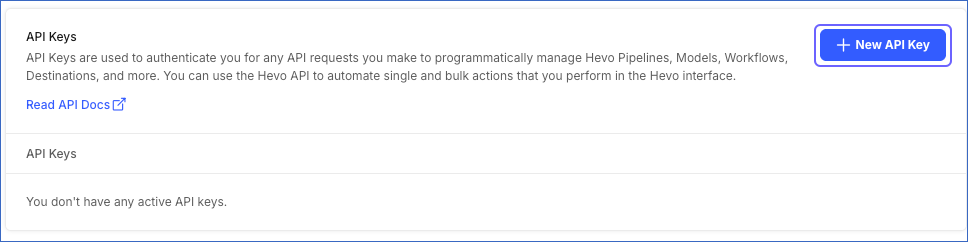
Click + New API Key to generate the API key for your account region.
-
In the API Key window, click the copy icon in the Access Key and Secret Key fields and save them securely like any other password. Optionally, click Download to save the API credentials on your local machine.
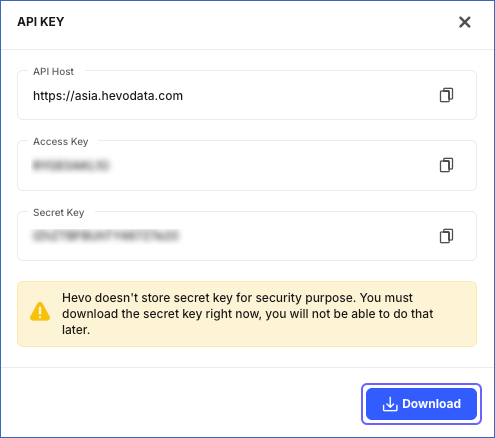
The Secret Key is not displayed once you close the API Key window. If you lose it, generate a new pair of API credentials and delete the existing pair. Read Rotating your API Credentials for the steps.
Roles and Permissions
A pair of API credentials belongs to the user who generated it and acts on their behalf. It can perform only the actions that this user’s role allows. API credentials are not shared across your team, so each user who needs API access generates their own pair. A role does not change what a read returns. Every endpoint that lists or retrieves something returns everything that your team has in the region of the base URL you call. For example, the Team Administrator and Pipeline Administrator roles allow a user to create, edit, and delete Pipelines, so a request that creates a Pipeline succeeds. The Pipeline Collaborator role allows a user to edit and view Pipelines but not create or delete them, so the same request is rejected.
If a request is rejected even though the credentials are valid, check the role assigned to the user who generated the credentials. A rejected request returns a 403 response code.
Creating a Pipeline that also creates its Destination needs the permission to create a Destination as well as the one to create a Pipeline. Read User Roles and Workspaces for more information about the actions that each role allows.
Authenticating your Requests
Each API request must carry your API credentials. Basic authentication sends them in an Authorization header, which Hevo reads on every request. The Access Key acts as the user name, and the Secret Key acts as the password.
Most HTTP clients build that header for you. You provide the two keys, and the client does the rest. For example, cURL takes them with the --user option:
curl --request GET \
  --url https://us.hevodata.com/api/v2/pipelines \
  --header 'accept: application/json' \
  --user '<ACCESS_KEY>:<SECRET_KEY>'
Replace us in the URL with your account region. Read Base URLs for the base URL of each region.
If your client does not build the header for you, you can construct it yourself. Basic authentication expects the two keys joined by a colon and encoded in Base64, sent after the word Basic:
Authorization: Basic base64(<ACCESS_KEY>:<SECRET_KEY>)For example, if your Access Key is ABC and your Secret Key is 123, you encode ABC:123 in Base64 and send the result:
Authorization: Basic QUJDOjEyMw==A request that is sent without API credentials or with credentials that are not valid is rejected with a 401 response code. This response is returned by the Hevo API gateway, and its body is different from the one returned by the API endpoints. Read Handling Errors for more information about the error responses.
Rotating your API Credentials
You can rotate your API credentials by generating a new pair and then deleting the existing one. You may want to rotate your API credentials in the following scenarios:
- The credentials have been exposed.
- Your organization's security policy requires you to replace them at a set interval.
- A team member who had access to them no longer needs it.
Perform the following steps to rotate your API credentials:
-
Generate a new pair of API credentials. Read Generating your API Credentials for the steps to do this.
-
Update your integrations to use the new pair, and confirm that your requests succeed.
-
Log in to your Hevo account and access the API Keys page for your account region.
-
In the API Key column, locate the Access Key of the old pair that you want to delete.
-
Click the delete icon corresponding to that Access Key.
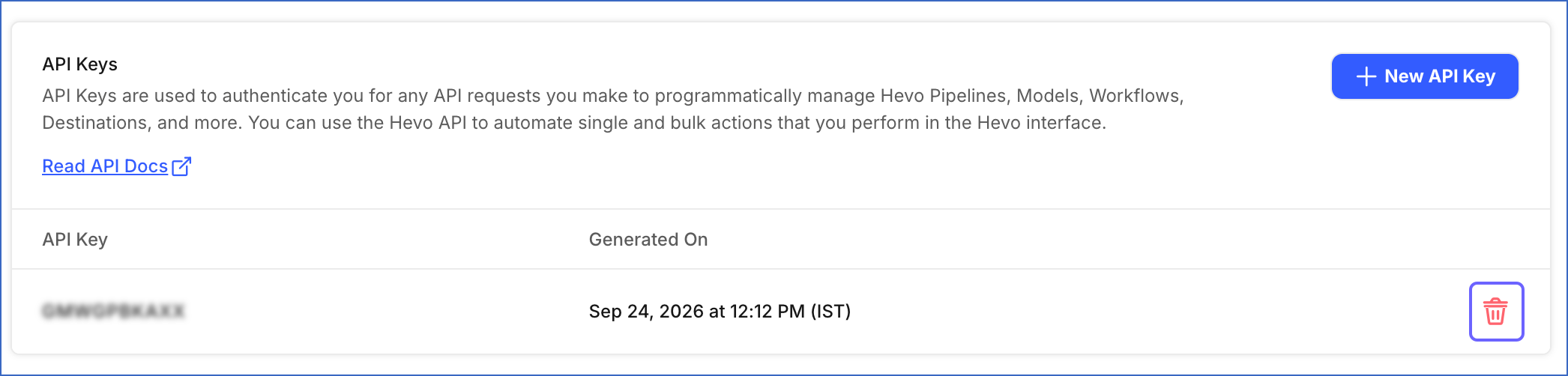
Deleting a pair of API credentials cannot be undone, and the deletion takes effect immediately. Any request that uses the deleted credentials is rejected with a
401response code, so make sure that your integrations use the new pair before you delete the old one.