
A job is one run of a Pipeline. Every sync, resync, historical load, and data refresher run produces a job, and the job records the data it moved and the time it took.
Refer to the following sections to read a Pipeline's job history:
- Listing Jobs: Read the jobs a Pipeline has run, and filter them by type or status.
- Reading the Counts: Read the number of Events and objects a job processed.
- Latency: Read the time taken to load Events to the Destination.
- Reading the Objects of a Job: Read the status and the Event counts of each object in a job.
- Canceling a Job: Stop a job that is running, and understand what Hevo completes before it stops.
Prerequisites
- An active Hevo account. You can start with a 14-day full-feature, free trial account.
- You are assigned the required role for the endpoint you want to use.
- You have generated your API credentials. Read Authentication for the steps to generate them.
- An existing Pipeline. Read Creating a Pipeline with Hevo API for the steps to create a Pipeline.
Listing Jobs
To read the jobs a Pipeline has run, you need to call the List All Jobs for a Pipeline endpoint. The jobs are listed in the order they ran, starting with the most recent.
Perform the following steps to list the jobs of a Pipeline:
-
Navigate to the List All Jobs for a Pipeline endpoint.
-
In the Path Params section, specify the
pipeline_id. This is the unique identifier of the Pipeline for which you want to read the jobs.
-
(Optional) In the Query Params section, specify
statusandtypeto return only the jobs you want. Repeat the parameter for several values. For example,status=FAILED&status=SKIPPEDreturns the failed and the skipped jobs.
-
The API request is simultaneously generated in the cURL Request block to the right. Click Try It! to make the API request and list the jobs.

For example, the following request lists the jobs of the Pipeline with the id 12345:
GET /api/v2/pipelines/12345/jobsOnce the request is complete, you will get a response code 200 with one page of the Pipeline's jobs.
Job Types
Each job has a type that states what the run was for:
| Type | Description |
|---|---|
HISTORICAL | Ingests the existing data from the Source. |
INCREMENTAL | Processes only new or updated records since the last job run. |
REFRESHER | Re-reads recent data from your Source to pick up records that arrived late, or that changed after Hevo first replicated them. Its Events are counted alongside the historical and incremental ones in the Pipeline’s totals for the last seven days. |
RESYNC | Re-ingests the data of the Pipeline's objects, or only of the objects you named in an object resync, without dropping the Destination tables. |
RESYNC_WITH_DROP_AND_LOAD | Re-ingests the data of the Pipeline's objects, or only of the objects you named in an object resync, with the Drop and Load action. Hevo drops and recreates each Destination table with the new schema, and then reloads the data ingested from the Source object. |
Job Statuses
Each job has one of the following statuses:
| Status | Description |
|---|---|
IN_PROGRESS | Job is currently running. |
COMPLETED | Job finished successfully and all records were processed. |
COMPLETED_WITH_FAILURES | Job finished execution but some records or objects failed to process. |
DEFERRED | Job finished, but the rate limit of the Source interrupted the ingestion of one or more objects. Hevo loaded the data that it ingested for those objects to the Destination. |
DEFERRED_WITH_FAILURES | Job finished, but the rate limit of the Source interrupted the ingestion of one or more objects, and one or more objects have failed Events. |
FAILED | Job failed due to an error. |
CANCELING | Job cancellation is currently in progress. |
CANCELED | Job was canceled before completion. |
SKIPPED | Job was skipped and did not run. |
To read every field of a single job, send a request to the Get Details of a Pipeline Job endpoint.
Reading the Counts
Every job reports the number of Events and objects it processed, and the time it took, in the following fields:
| Field | Description |
|---|---|
events_ingested | Number of Events ingested from the objects processed in the job. |
events_loaded | Number of Events loaded to the Destination for the objects processed in the job. |
events_failed | Number of Events that were not loaded to the Destination. |
objects_success | Number of objects processed successfully. |
objects_queued | Number of objects waiting to be processed. |
objects_skipped | Number of objects skipped during processing. |
objects_failed | Number of objects that failed processing. |
duration | The time taken to execute the job, in milliseconds. For a job that is still running, this value is the time elapsed since the job started, and it increases with each request. |
The events_ingested and events_loaded counts differ while a job is still running, or when some Events failed to load.
Latency
The latency field reports the time taken to load Events to the Destination, in milliseconds, so a value of 1000 is one second. It returns min, max, and mean across the objects in the job, and it is always returned. Its three values are 0 when Hevo has not measured the latency of the job, as for a historical load or a resync.
For example, the following latency reports that the lowest object-level latency was 1.2 seconds, the highest was 9.8 seconds, and the average across the objects in the job was 3.1 seconds:
"latency": { "min": 1200, "max": 9800, "mean": 3100 }Reading the Objects of a Job
To read the status and the Event counts of each object in a job, you need to call the List All Objects Processed in a Pipeline Job endpoint.
Perform the following steps to read the objects of a job:
-
Navigate to the List All Objects Processed in a Pipeline Job endpoint.
-
In the Path Params section, specify the
pipeline_idand thejob_id. Read Listing Jobs for the steps to find the job identifier.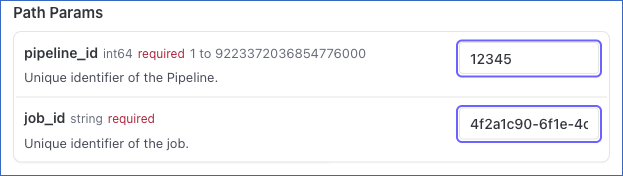
-
The API request is simultaneously generated in the cURL Request block to the right. Click Try It! to make the API request and read the objects.
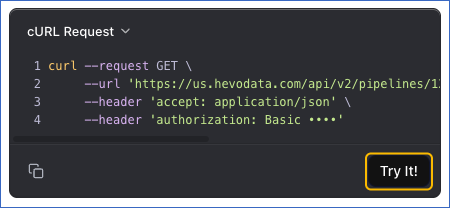
For example, the following request reads the objects of one job in the Pipeline with the id 12345:
GET /api/v2/pipelines/12345/jobs/4f2a1c90-6f1e-4c3c-9a1d-2f9f0c0f1a77/objectsOnce the request is complete, you will get a response code 200 with the status and the Event counts of each object in the job. A count is null while the stage it belongs to has not run:
events_ingestedisnulluntil the object has been ingested.events_loadedisnulluntil the object has been loaded.
The offset field is the position in the Source that the object was read up to in this job, and it is null until the object has been ingested.
Canceling a Job
You can cancel a job that is running, to stop the work it is doing.
Following are the scenarios in which you may want to cancel a job:
- Your Source is unavailable for a while, such as during a database upgrade, and you do not want the job to keep running.
- A historical load was started by mistake and you do not want it to continue.
- A job has to be stopped so that you can sync the Pipeline on demand, which is not allowed while another job is running.
You must consider the following before you cancel a job:
-
Only a running job can be canceled. A job that has finished, or one that is already being canceled, returns a 400 that names the state it is in. A job with the
FAILEDstatus can still be canceled while Hevo is trying to load its data to the Destination. A cancel request is also rejected with a 400 while Hevo is processing another cancel request or a resync of the Pipeline.An incremental job that runs alongside a historical load or a resync cannot be canceled on its own, and returns the same 400 even though it reads as running. Cancel the historical load or the resync instead, which cancels the incremental jobs with it. A
job_idthat belongs to another Pipeline returns a 404. -
The job does not stop as soon as you send the request. Read the job with the Get Details of a Pipeline Job endpoint to see when its status changes to
CANCELED. If the job finishes after Hevo checks it but before the cancel request arrives at the service that runs it, the request returns a 500. Read the job again to see its final status. -
The Pipeline keeps its schedule, and the next job runs at the configured sync frequency.
-
Data already loaded into the Destination is not removed.
-
Jobs that are queued behind the job are not canceled.
Perform the following steps to cancel a job:
-
Navigate to the Cancel a Pipeline Job endpoint.
-
In the Path Params section, specify the
pipeline_idand thejob_id. Read Listing Jobs for the steps to find the job identifier.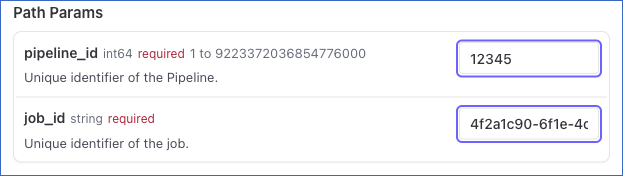
-
The API request is simultaneously generated in the cURL Request block to the right. Click Try It! to make the API request and cancel the job.
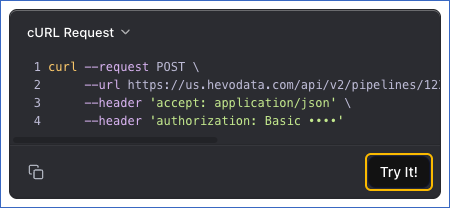
For example, the following request cancels one job in the Pipeline with the id 12345:
POST /api/v2/pipelines/12345/jobs/4f2a1c90-6f1e-4c3c-9a1d-2f9f0c0f1a77/actions/cancelOnce Hevo accepts the cancellation, you will get a response code 202. The response returns the details of the job as they were when you sent the request, so the status does not show CANCELED yet. Read the job at regular intervals until its status changes to CANCELED. Send each request to the Get Details of a Pipeline Job endpoint.