
You can change the name of a Pipeline's Source, its configuration details, or its credentials, without recreating the Pipeline.
Refer to the following sections to change a Source:
- Changing a Source: Send the name and the configuration details you want to change.
- Replacing an Authorization Created in the Hevo UI: Replace an authorization created through the Hevo UI with your own credentials.
- Applying a Change: The Pipeline states in which a change is accepted.
Following are the scenarios in which you may want to change a Source:
- The credentials that Hevo connects with have expired, or have been replaced at your Source.
- You want to change a configuration detail, such as the period of historical data that Hevo replicates.
- You want to rename the Source so that it is easier to identify.
You must consider the following before you change a Source:
-
You cannot change the connector that a Source uses. To replicate data from a different type of Source, create a new Pipeline. Read Creating a Pipeline with Hevo API for the steps.
-
Send only the values that you want to change. Hevo keeps the current value of every field, and every
configkey, that you do not send. A request that sends noname, noconfigobject and noauthobject returns a 400 error.A body that sends only
authis valid. Sending aconfigkey with the valuenullclears it, after which the connector default applies. -
Only the fields that the connector allows you to edit can be sent. A field that you cannot change after the Pipeline is created returns a
400error that names the field. Hevo rejects it even when the value you send is the same as its current value.The connector schema does not mark which fields you can change. In the Hevo UI, the page where you edit a Source shows the fields that you cannot change as grayed out. Read Modifying the Source Configuration for the steps to open that page. For example, for a MySQL Source, you can change only the password, the SSH tunnel settings and the SSL settings, and you cannot change the host, port, user or database name. For a PostgreSQL Source, you can also change the replication slot and the write-ahead log settings. If Hevo generates the key pair for a connector, sending
private_keyreturns a400error.Changing
config.authentication_methodwithout sendingauthin the same request returns a400error, because the change cancels the current authorization. A change to a field that the provider uses to build the OAuth connection, such as a Salesforce account type or a Zendesk domain, also requiresauthin the same request. -
Hevo validates the change and runs a Source connection test before it saves anything. A configuration that your Source rejects returns a
400stating the reason, and nothing is saved. Hevo runs the test only when the request changesconfigor sendsauth; a request that changes only the name is not tested. The request waits up to five minutes for the test, and a test that is still running after that returns a 500, with nothing saved. -
A name must be unique within your team. A blank name, or a name already in use, returns a
400.
Prerequisites
- An active Hevo account. You can start with a 14-day full-feature, free trial account.
- You are assigned the required role for the endpoint you want to use.
- You have generated your API credentials. Read Authentication for the steps to generate them.
- An existing Pipeline. Read Creating a Pipeline with Hevo API for the steps to create one.
Changing a Source
To change a Source, you send the pipeline_id of the Pipeline it belongs to in the path, and the details you want to change in the request body. To make an API call, you need to first perform the following steps:
-
Select your Hevo account region from the Base URL drop-down.
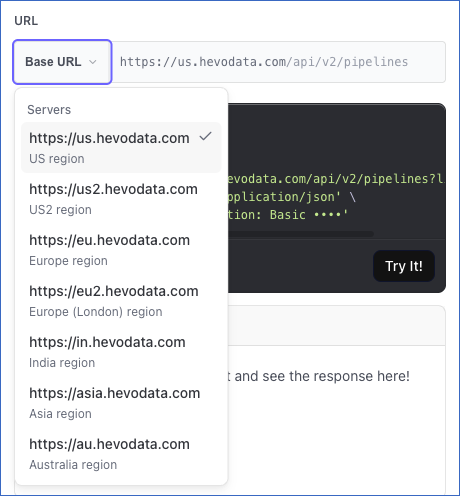
-
If not already authenticated, enter your Access Key and Secret Key in the CREDENTIALS section. If you do not have these keys, refer to Generating your API Credentials for the steps to generate them.
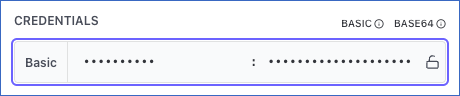
The steps to change a Source differ based on the API version that you use:
Changing a Source with version 2
If you want to change a Source using version 2, perform the following steps:
- Read the connector configuration: Retrieve the configuration details that your Source accepts.
- Send the change: Specify the configuration details you want to change in the
configobject of the Modify Source Configuration in a Pipeline endpoint.
Step 1: Read the Connector Configuration
Version 2 does not list the configuration details on the endpoint, so you read them from the connector before you send the request. The configuration details differ for every Source type.
Perform the following steps to build your config object:
- Call the Get Details of a Pipeline endpoint to retrieve the
connector_idof your Source. The response names the Source and its connector, and does not include any Source configuration. - Call the Get Configuration Details of a Source Connector endpoint with that
connector_idto retrieve every configuration detail the connector accepts, along with the ones that are mandatory. - Read the respective Source documentation for the steps to retrieve the values that its
configobject requires.
Read Creating a Pipeline with Hevo API for the steps to read the response and build a config object from it.
Step 2: Send the Change
Once your config object is ready, you send it to the Modify Source Configuration in a Pipeline endpoint, along with a new name for the Source, if you want to change the name. The endpoint page does not list the config keys, so you enter the Pipeline identifier and the name on the page, copy the request generated from them, and add your config object to it.
Perform the following steps to change your Source:
-
Navigate to the Modify Source Configuration in a Pipeline (PATCH) endpoint.
-
In the Path Params section, specify the
pipeline_id. This is the unique identifier of the Pipeline that contains the Source you want to change.
-
(Optional) In the Body Params section, you can specify a new
namefor your Source.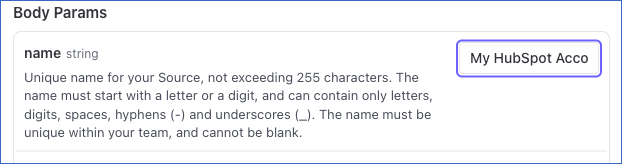
-
Click the Copy icon below the cURL Request block to copy the request.
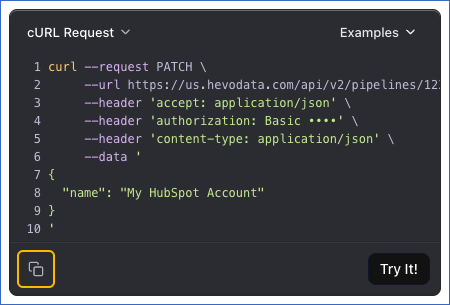
-
In the copied request, add a
configobject containing the keys you want to change. Your request is then complete, and you can send it from your own client, such as Postman, or by running the command in a terminal.
Once the Source is changed, you will get a response code 202 with the updated details of your Pipeline. The code value is Accepted. The response does not include the Source configuration.
The following example renames the Source of the Pipeline with the id 12345, and changes the period of historical data that Hevo replicates:
curl --request PATCH \
  --url https://us.hevodata.com/api/v2/pipelines/12345/sources \
  --header 'accept: application/json' \
  --header 'content-type: application/json' \
  --user '<ACCESS_KEY>:<SECRET_KEY>' \
  --data '{
  "name": "My HubSpot Account",
  "config": {
    "historical_sync_timeframe": "LAST_3_MONTHS"
  }
}'
A common reason to change a Source is that the credentials Hevo connects with have been replaced at your Source. You send the new credentials in the same request, in the config object for a static token or in the auth object for your own OAuth app. Read Rotating Credentials for the steps.
Note: If your client or proxy cannot send a PATCH request, send the same request body as a POST request to the Modify Source Configuration in a Pipeline (POST) endpoint.
Changing a Source with version 1
Version 1 lists the configuration details for each connector on the endpoint, so you select your Source type and change the values on the endpoint page.
Note: Version 1 supports all variants of PostgreSQL, MySQL, and Oracle Sources only. To change the Source of any other Pipeline, you must use version 2.
Perform the following steps to change your Source:
-
Navigate to the Modify Source Configuration in a Pipeline endpoint.
-
In the Path Params section, specify the
pipeline_id. This is the unique identifier of the Pipeline that contains the Source you want to change.
-
In the Body Params section, select your Source type from the drop-down. For example, here, we are selecting SOURCE_CONNECTOR_POSTGRES.

-
Specify the new values for the configuration details you want to update. You do not need to send the configuration details that remain unchanged, because Hevo keeps their current values. A configuration detail that cannot be edited returns a
400even when you send its current value. The API request is simultaneously generated in the cURL Request block to the right. -
Click Try It! to make the API request and change your Source.
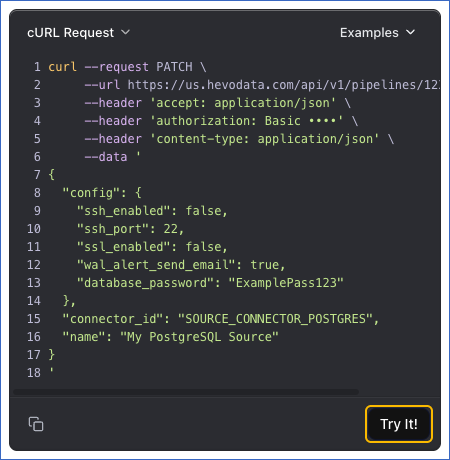
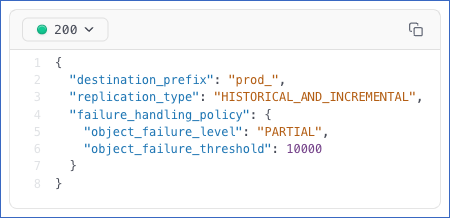
Once the Source is changed, you will get a response code 200 in the response block with the updated details of your Pipeline.
The following example changes the database password of a PostgreSQL Source in the Pipeline with the id 12345:
curl --request PATCH \
  --url https://us.hevodata.com/api/v1/pipelines/12345/sources \
  --header 'accept: application/json' \
  --header 'content-type: application/json' \
  --user '<ACCESS_KEY>:<SECRET_KEY>' \
  --data '{
  "connector_id": "SOURCE_CONNECTOR_POSTGRES",
  "name": "My PostgreSQL Source",
  "config": {
    "database_password": "<your new password>"
  }
}'
Always send connector_id in the request body. Hevo uses this value to identify the type of Source you are changing.
Replacing an Authorization Created in the Hevo UI
Sending an auth object rotates the credentials of an OAuth Source, if its connector supports authorization through the API, whether it was authorized in the Hevo UI or through the API. No confirmation is needed. For an OAuth connector that does not support it, the request returns a 400 error, and you must authorize the Source in the Hevo UI. Send your app’s client_id and client_secret under client_access, along with any app-level credential that the provider needs, and a refresh_token or an access_token:
{
  "auth": {
    "client_access": {
      "client_id": "<your client id>",
      "client_secret": "<your client secret>"
    },
    "refresh_token": "<new refresh token>"
  }
}
Hevo then starts using the credentials you send, and stops using the authorization they replace. A request that is missing the client ID or client secret, or that sends no token, returns a 400 error.
Sending auth to a connector that does not authorize with OAuth also returns a 400 error.
To test the Source connection, Hevo uses the credentials in the auth object to generate an access token. If the test fails, Hevo saves nothing and deletes the access token that it generated.
Applying a Change
The Pipeline has to be in the Initialized or Disabled state for a change to be accepted. A Pipeline in the Initializing, Enabling, Disabling or Restarting state is moving from one state to another, and returns a 409. A Pipeline that is being deleted returns a 404 instead, and a Pipeline in the Failed state returns a 400 error.
A Pipeline with an edit in progress in the Hevo UI also returns a 409, until those changes are submitted or discarded.
Changing a Source does not change the state of the Pipeline. A Pipeline that is replicating data keeps replicating, and if the Pipeline is in the Disabled state, it remains Disabled. Read Understanding Pipeline States for more information.