
A Pipeline replicates data on the schedule you set for it. You can also replicate data outside that schedule, to bring your Destination up to date or to start again from the beginning.
Refer to the following sections to replicate data outside the normal schedule:
- Triggering a Sync: Replicate the records that changed since the last run, without waiting for the next scheduled one.
- Resyncing Objects: Re-ingest the data for the objects you specify, from the beginning.
- Resyncing a Pipeline: Re-ingest the data for every active object in the Pipeline, from the beginning.
Prerequisites
- An active Hevo account. You can start with a 14-day full-feature, free trial account.
- You are assigned the required role for the endpoint you want to use.
- You have generated your API credentials. Read Authentication for the steps to generate them.
- An existing Pipeline. Read Creating a Pipeline with Hevo API for the steps to create one.
Triggering a Sync
You can trigger a sync to replicate data from your Source now, rather than waiting for the next scheduled run. Hevo starts a job that ingests the data added or changed since the last successful run, for every object included in the Pipeline.
Following are the scenarios in which you may want to trigger a sync:
- You need the latest data in your Destination before a report runs, rather than waiting for the next scheduled run.
- Your Pipeline is scheduled on demand, which means
schedule.sync_typeisON_DEMAND. A sync is the only way such a Pipeline replicates data. - You corrected some data in your Source, and the change must be loaded into the Destination now.
You must consider the following before you trigger a sync:
- The Pipeline has to be in the
Initializedstate. - Hevo runs the sync as a job. The
stateof the Pipeline remainsInitializedwhile the sync is in progress. - A Pipeline that already has a job running returns a 409. Wait for the job to finish, or cancel it. Read Canceling a Job for the steps.
Perform the following steps to trigger a sync:
-
Navigate to the Trigger Manual Sync for a Pipeline endpoint.
-
In the Path Params section, specify the
pipeline_id. This is the unique identifier of the Pipeline you want to sync.
-
The API request is simultaneously generated in the cURL Request block to the right. Click Try It! to make the API request and sync your Pipeline.
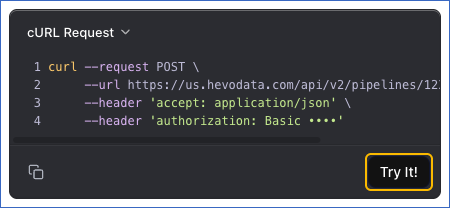
For example, the following request syncs the Pipeline with the id 12345:
POST /api/v2/pipelines/12345/actions/sync-nowOnce the sync is accepted, you will get a response code 202. To track its progress, read the Pipeline's job history. Read Viewing Pipeline Job History for more information.
The request returns a 409 when a job is already running for the Pipeline, an edit of the Pipeline is being applied, or the Pipeline is changing state.
Read Sync Now for more information about the actions performed on your Pipeline when you sync it on demand.
Resyncing Objects
You can resync selected objects to replicate their data from the Source again, from the beginning, without resyncing the whole Pipeline. Hevo re-ingests the historical data for each object you specify and loads it into the Destination. Hevo keeps your Destination tables and loads the data into them again, unless you specify that Hevo must drop and recreate those tables. With the APPEND load mode, loading the data again can create duplicate records in the Destination tables.
Following are the scenarios in which you may want to resync objects:
- A few objects are missing records, and the rest of the Pipeline is replicating correctly.
- An object's data in the Destination does not match the Source.
- A schema change in the Source has left an object unable to load.
You must consider the following before you resync objects:
- You can resync objects from any state except while the Pipeline is being disabled or is disabled, and after a failed setup, enable or disable. A request in these states returns a
400. - An object that is not selected for replication cannot be resynced. Select it with the Manage Objects in a Pipeline (PATCH) endpoint instead, which loads its data for you. An object that has a parent object is also rejected, because Hevo resyncs it along with its parent, so name the parent object instead. Hevo also rejects an object that does not allow a resync in its current state, or is not in the
ACTIVE,INCONSISTENTorRESETTINGstatus. A name the Pipeline does not have returns a 404, and a resync that is already running for one of the objects returns a 409. - The schedule, the Pipeline state, and every object you do not specify are left unchanged.
- A resync re-ingests every record of the objects you specify from the beginning, so it can consume a large number of Events, depending on how much data those objects contain.
- To resync every active object rather than the ones you specify, resync the Pipeline instead. Read Resyncing a Pipeline for the steps.
Perform the following steps to resync objects:
-
Navigate to the Trigger Resync for a Set of Objects endpoint.
-
In the Path Params section, specify the
pipeline_id. This is the unique identifier of the Pipeline with the objects that you want to resync.
-
In the Body Params section, specify the following:
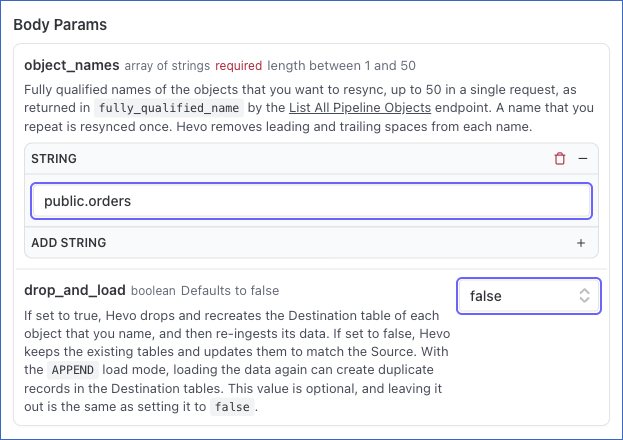
object_names: The fully qualified names of the objects you want to resync. Specify at least one object, and up to 50 in a single request. A name is the value that the object list returns infully_qualified_name, such aspublic.orders. Hevo removes leading and trailing spaces and resyncs a repeated name once. A blank name, more than 50 names, or a missing list each return a 400 that names the field. Read Listing Objects for the steps to find these names.drop_and_load: If you want Hevo to drop and recreate the Destination table for each object you specify, set this to true. This removes the data already in the table, so the Destination has no data for that object until the load is complete. Set this to false to keep the existing table and update it to match the Source schema. This field is optional, and leaving it out is the same as setting it tofalse.
-
The API request is simultaneously generated in the cURL Request block to the right. Click Try It! to make the API request and resync the objects.
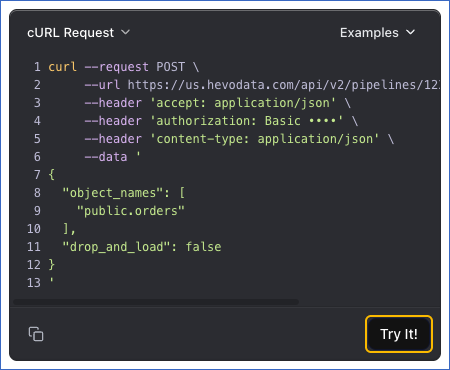
For example, the following request resyncs one object in the Pipeline with the id 12345:
POST /api/v2/pipelines/12345/objects/actions/resyncSend the following request body with it, which names the object to resync and keeps its Destination table:
{
  "object_names": ["public.orders"],
  "drop_and_load": false
}
Once the resync is accepted, you will get a response code 202.
Read the Pipeline's job history to track its progress. Read Viewing Pipeline Job History for more information.
Resyncing a Pipeline
You can resync a Pipeline to run the historical load again for every active object in it. Hevo re-ingests the historical data from your Source objects and loads it into the Destination. By default, Hevo keeps your Destination tables, applies any schema changes to them and loads the data into them again. With the APPEND load mode, loading the data again can create duplicate records in the Destination tables. If an object is blocked by a schema change that Hevo cannot apply to the existing table, you can have the Destination tables dropped and recreated as part of the resync.
Following are the scenarios in which you may want to resync a Pipeline:
- The data in the Destination does not match the Source across most objects.
- You changed the Source configuration in a way that affects the data already replicated.
- The Pipeline failed for a long period, and you want to replicate all its data again instead of resyncing individual objects.
You must consider the following before you resync a Pipeline:
- The Pipeline has to be in the
Initializedstate or in a failed state. - Any job that is running when you resync is canceled, and the Pipeline does not run to its schedule until the resync is complete.
- A historical load re-ingests every record from the beginning, so the resync can consume a large number of Events, depending on how much data your Source objects contain.
Perform the following steps to resync a Pipeline:
-
Navigate to the Resync a Pipeline endpoint.
-
In the Path Params section, specify the
pipeline_id. This is the unique identifier of the Pipeline you want to resync.
-
In the Body Params section, specify
drop_and_load. If you want Hevo to drop and recreate the Destination tables, set this to true. This removes the data already in them, so the Destination has no data until the load is complete. Set this to false to keep the existing tables and update them to match the Source schema. This field is optional, and leaving it out is the same as setting it tofalse.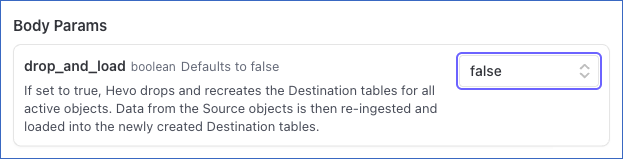
-
The API request is simultaneously generated in the cURL Request block to the right. Click Try It! to make the API request and resync your Pipeline.
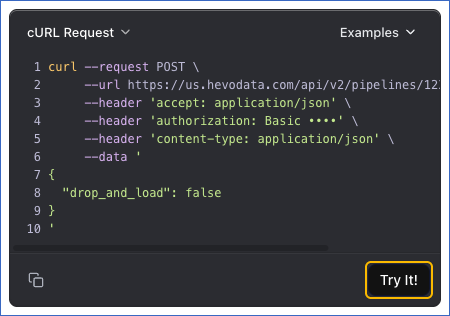
For example, the following request resyncs the Pipeline with the id 12345:
POST /api/v2/pipelines/12345/actions/resyncSend the following request body with it, which keeps the Destination tables:
{ "drop_and_load": false }Once the resync is accepted, you will get a response code 202 with the Pipeline in the Restarting state. Read the Pipeline at regular intervals until the state changes to Initialized. Refer to Reading one Pipeline for the steps.
Read Resync Pipeline for more information about the actions performed on your Pipeline when you resync it.