
When an API request returns a large number of records in a single response, it can slow performance and make data handling difficult. Pagination divides the response into smaller, manageable chunks called pages, controlling the number of records per request and making large datasets easier to work with.
Hevo uses cursor-based pagination through the cursor and limit parameters.
Request Parameters
| Name | Data Type | Description |
|---|---|---|
| cursor | string | Represents the position of the last record in the response page. Leave this field empty in the first request. For subsequent requests, pass the Note: If this field is empty after the first request, the API returns the first page of results again. |
| limit | number | The maximum number of records to be returned per API response. Minimum value: 1, Maximum value: 500. Default value: 100. |
How to Paginate
Step 1: Fetch the first page
Make a request without a cursor parameter. Use limit to control page size.
curl --request GET \
  --url 'https://asia.hevodata.com/api/v1/pipelines?limit=20' \
  --header 'accept: application/json' \
  --header 'authorization: Basic <your_api_token>'
Replace <your_api_token> with your API token. Refer to Generating your API Credentials.
Response Format
| Property | Data Type | Description |
|---|---|---|
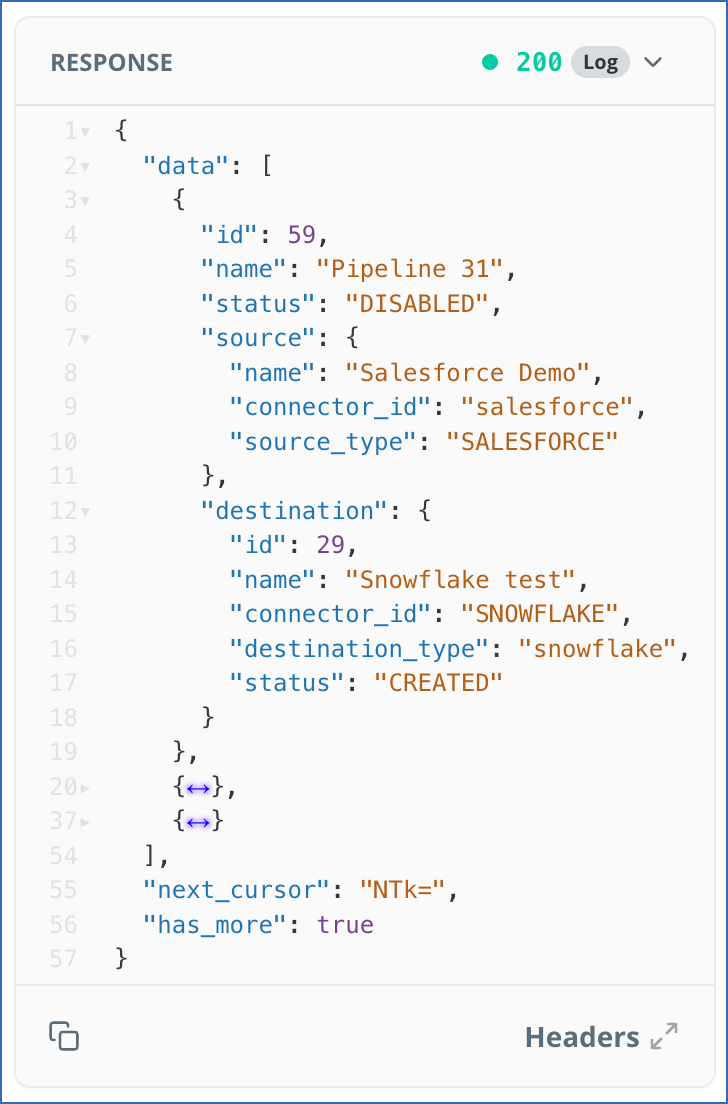
| next_cursor | string | A token used to fetch the next page of results. |
| has_more | boolean | A boolean value that indicates whether additional results are available. |
| data | array | An array of records returned for this request. |
Sample Response
Step 2: Fetch the next page
Take the next_cursor value from the previous response and pass it as the cursor parameter in your next request.
curl --request GET \
  --url 'https://asia.hevodata.com/api/v1/pipelines?cursor=NTk%3&limit=20' \
  --header 'accept: application/json' \
  --header 'authorization: Basic <your_api_token>'
Step 3: Detect the last page
Stop paginating when either of the following is true:
next_cursorreturnsnullhas_morereturnsfalse
This indicates that there are no more pages to retrieve and the API has returned all available data.
Example
The following example shows how to fetch details of 100 Pipelines in pages of 20.
Request 1: Fetch the first page (records 1–20):
GET /api/v1/pipelines?limit=20The response returns has_more: true and next_cursor: "NTk=", indicating that more records are available.
Request 2: Pass the next_cursor value from the previous response to fetch the next page (records 21–40):
GET /api/v1/pipelines?cursor=NTk%3&limit=20Repeat this until the response returns has_more: false or next_cursor: null, indicating that all records have been retrieved.
Note: The data array on the last page may return fewer records than the requested limit. This is expected behavior. Use has_more to determine whether more pages exist rather than relying on the number of records returned.